

A practical (and comprehensive) workflow with real tools and real prompts.
AI is everywhere.
But for event marketers, it hasn’t exactly made life easier.
Your team is smaller.
Your deadlines are tighter.
Registrations come later than ever.
And leadership still wants growth — with fewer resources and more channels than any sane human can manage.
So yes, AI matters. But not in the way the industry usually talks about it.
This isn’t about “magic tools” or futuristic promises.
This is about real use cases that solve real pains, in a workflow you can actually implement in 2026 with the budget and bandwidth you have now.
If you’ve ever thought, “I need AI to save me time, not give me more work,” this guide is for you.
💡 What You’ll Learn
This guide covers 16 practical AI use cases across 6 event marketing campaign phases, with real tools, actual prompts, and workflows you can implement today—no data science degree required.
📑 Quick Navigation
The realities event marketers face in 2026
Before we jump into solutions, let’s say the quiet part out loud:
- Content demands never end.
- Budgets didn’t grow — expectations did.
- Personalization is required, but data maturity is lagging.
- Registrations keep coming later and later (45% in the final 4 weeks, 22% in the final 7 days). 📊 Additional reading: How to minimize late registrations at your event
- Trust in AI is low — trust in peers is high.
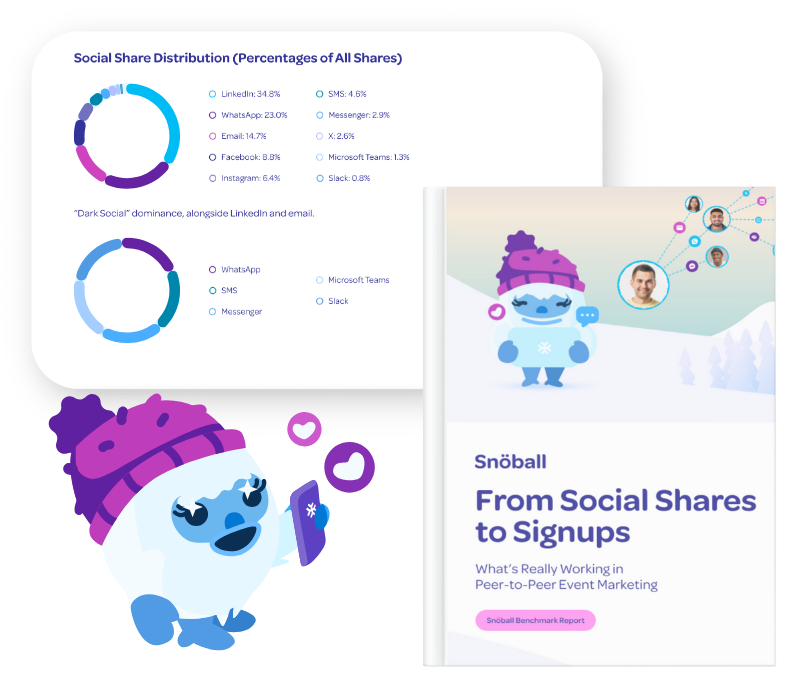
The 2026 Snöball Peer-to-Peer Benchmark Report shows 31.9–53.7% conversion from peer shares. For the complete insights, download the full report
- Everyone is using AI to write content, so everything sounds the same.
According to PCMA Convene’s 32nd Meetings Market Survey Results, 65% of eventprofs are using AI tools in their workflows. Further categorization of AI use revealed:
- 75% are using Generative AI for research
- 73% to create marketing copy
- 65% for session/agenda creation
- 23% for marketing segmentation
- 15% for site and speaker selection
The intent is there. And the tools are plenty.
Event marketers just need a simple system to make their jobs easier.
So here it is.
📋 PHASE 1: PRE-EVENT (6–9 months out)
1Audience Listening and Intent Discovery
Tools: ChatGPT, Claude, Typeform AI summaries, Google Forms AI insights, social listening exports, Zoom chat logs
Workflow
Whether you have rich post-event surveys or only scattered comments and chats, the goal is the same. AI helps you turn unstructured feedback into a clear understanding of what your audience cares about.
If you have survey data (Scenario A):
- Export open-text survey responses, NPS comments, session reviews, and app feedback.
- Drop them into ChatGPT or Claude in batches.
- Ask AI to cluster themes, motivations, frustrations, and decision drivers.
If you do not have survey data (Scenario B):
- Export attendee chats from Zoom, session Q&A, social comments, LinkedIn replies, or community discussions.
- Paste these into AI and ask it to extract patterns, repeated topics, and audience signals.
- Let AI identify what people were excited about, confused by, or hoping for.
Both approaches give you the same output:
Clear attendee intent categories that drive better messaging.
Prompt:
“Analyze the following attendee feedback. It includes survey responses, chat transcripts, comments, and social posts. Cluster the insights into themes, identify attendee motivations, highlight common objections, and create 5–7 intent-based audience segments. For each segment, list their goals, challenges, content interests, and the messaging that will resonate most.”
✅ Outcome
You move from guesswork to clarity. AI gives you a usable map of what attendees want, even if your feedback is limited, scattered, or too overwhelming to analyze manually.
In a recent CEIR webinar, Chris Pendley of Messe Frankfurt North America mentioned his team uses ChatGPT for real-time social listening combined with rapid content creation. By analyzing audience conversations and sentiment across platforms, the AI helps his team create campaign copy that directly responds to what their community is talking about.
This shortens the production cycle dramatically while ensuring content relevance – instead of creating generic promotional posts, they’re publishing timely, sentiment-driven messages that resonate with current audience interests.
More tools to explore
- Dovetail AI – Advanced user research analysis, clusters feedback automatically
- Insight7 – Transcribes and analyzes customer conversations, identifies patterns
- Medallia – Text analysis and sentiment clustering from surveys
2AI-Assisted Campaign Planning
Tools: ChatGPT, Notion AI
Workflow
Paste your event overview with dates, goals, audience, and budget.
Prompt:
“Build a 16-week event marketing plan that includes:
– weekly marketing themes
– email cadence
– speaker-driven content
– exhibitor activation ideas
– social content angles
– landing page updates
– partner marketing plays
– suggested KPIs
Make the plan realistic for a small team with limited budget.”
Refine the output by asking AI:
“Condense this into a one-page plan my leadership can approve.”
✅ Outcome
You get a customized, editable marketing blueprint that saves days of planning time.
More tools to explore
- Jasper (Jasper Chat) – Marketing-focused AI with campaign planning templates
- Copy.ai Workflows – Automated campaign sequence generation
- Anyword – Predictive performance scoring for campaign copy
3High-Velocity Content Production
Tools: ChatGPT, Canva AI, Descript, OpusClip
Workflow
- Feed AI a speaker bio or topic.
- Ask for 20 social post angles, 5 email intros, and a short landing page variant.
Prompt:
“Write 20 social posts promoting this speaker session. Mix formats: educational, curiosity, data-driven, inspirational, problem-solution, and FOMO. Keep them short and mobile ready.”
- Use OpusClip or Descript to turn speaker videos into auto-captioned clips.
- Drop clips into Canva AI for quick branded templates.
✅ Outcome
You build a library of reusable content assets that support speakers, exhibitors, and internal channels.
Tools like Gamma can also do wonders for creating slides and presentations.
In the CEIR webinar, Steven Carlisle from CloserStill Media talked about using the Gamma.app to create polished presentations without needing advanced design skills or spending hours formatting slides. The platform uses AI to automatically generate professional layouts, suggest visual hierarchies, and create cohesive design systems.
What used to require a graphic designer and multiple revision rounds now happens in a fraction of the time, allowing Steve’s team to focus on content strategy rather than slide aesthetics.
More tools to explore
- Synthesia – AI video creation with avatars (great for speaker intros)
- Pictory AI – Turns scripts and articles into videos automatically
- Runway ML – Advanced video editing and generation
- Lumen5 – Transforms blog posts into video content
- Headliner – AI-powered audiogram creation from audio clips
- Kapwing AI – Video editing with smart tools and templates
4Practical Personalization Without New Martech
Tools: ChatGPT, CRM filters
Workflow
- Export your attendee list with job title, industry, seniority, and past attendance.
- Paste a sample into ChatGPT.
Prompt:
“Cluster these contacts into logical personas based on job function, seniority, motivations for attending, and likely objections. Create 3 messaging angles and one recommended CTA for each persona.”
Use these personas to personalize:
- email subject lines
- session recommendations
- landing page blocks
- speaker highlight angles
✅ Outcome
You achieve practical personalization without a giant Martech overhaul.
More tools to explore
- Seventh Sense – AI email send-time optimization
- Jacquard – AI-powered email subject line and copy optimization
- Persado – Generates personalized marketing language at scale
🎯 PHASE 2: MID-CAMPAIGN (3–6 months out)
5Messaging Gap Identification and Conversion Optimization
Tools: ChatGPT, Instapage AI insights, Hotjar AI summaries
Workflow
- Paste your landing page copy into ChatGPT.
Prompt:
“Analyze this event landing page. Identify unclear value propositions, credibility gaps, confusing sections, missing cognitive motivators, and opportunities to add social proof. Suggest a revised headline, subheadline, CTA, and structure.”
- Import scroll maps or heat maps into AI for plain-language interpretation:
“What are visitors missing or hesitating on based on this behavior pattern?”
✅ Outcome
Clear, actionable fixes for landing pages and emails, backed by behavioral insight.
More tools to explore
- Unbounce Smart Traffic – AI-powered landing page variant optimization
- VWO Intelligence – AI insights for A/B testing and behavior analysis
- Optimizely Intelligence – Predictive analytics for experiments
- Mutiny – AI personalization for B2B websites
6Predictive Registration Behavior Clustering
Tools: ChatGPT, your CRM, Excel
Workflow
Late registrations are now a structural challenge for event marketers.
If you can identify who tends to register late, what triggers their decision, and which groups respond to social proof or urgency, you can shape messaging that moves more registrations earlier in the cycle.
Here is how to uncover those patterns using AI.
Step 1: Export your registration data
Include:
- registration timestamps
- job titles
- industries
- referral sources
- past attendance behavior
- discount code usage
- content interactions if available
Step 2: Paste a sample into ChatGPT or Claude
Prompt:
“Analyze these attendee records. Identify patterns among people who registered in the final 14 days compared to early registrants. Highlight common roles, industries, behaviors, and content triggers. Explain why these groups may delay committing. Recommend targeted nudges, messaging themes, and social proof for each late-registering group.”
Step 3: Ask for a persona-specific nudge strategy
Examples:
- urgency-based messaging
- peer influence prompts
- manager-approval templates
- budget justification notes
- content relevance reminders
- exhibitor ROI tie-ins
✅ Outcome
You gain a clear understanding of which audiences delay registration and why.
This insight helps you:
- create targeted early-commitment campaigns
- adjust your content pacing
- build personalized nudges
- activate advocates who influence late deciders
- forecast more accurately
- reduce final-week panic
This is not just about predicting behavior.
It is about unlocking the levers that change it.
More tools to explore
7AI-Powered Social Proof Engine
Tools: Descript, Otter AI, ChatGPT
Workflow
Step 1: Gather what you already have
Session recordings, speaker interviews, survey comments, or exhibitor feedback.
Anything with someone talking about the event.
Step 2: Transcribe it
Upload the video or audio into Descript, Otter, or Fireflies to create a text transcript.
Step 3: Let AI pull the strongest moments
Paste sections of the transcript into ChatGPT with a simple prompt:
Prompt:
“Extract the 15 strongest quotes related to value, ROI, learning, networking, and experience. Rewrite each quote in a concise, shareable format suitable for a testimonial graphic or landing page.”
Step 4: Repeat with other recordings or comments
Do this for speakers, attendees, exhibitors, or past sessions.
In minutes, you will have a variety of quotes for different audiences.
✅ Outcome
A simple, repeatable way to build a library of social proof without rewatching hours of content.
You get quotes and micro-stories you can plug into:
- landing pages
- email sequences
- speaker promo kits
- exhibitor outreach
- social posts
- P2P campaigns
More tools to explore
- Fireflies.ai – Meeting transcription and insight extraction
- Grain – Records, transcribes, and clips meeting highlights
- Fathom – AI meeting assistant with highlight reels
⚡ PHASE 3: LATE-STAGE CAMPAIGN (0–8 weeks out)
8AI Objection Handling and Value Reframing
Tools: ChatGPT
Workflow
Paste your registration page and campaign messaging into AI.
Prompt:
“List the top 12 objections someone would have to registering for this event at this stage. For each objection, write a counter-message, an email snippet, a landing page FAQ entry, and a CTA variation.”
Then create persona-specific objections.
✅ Outcome
Sharp, accurate late-stage messaging that counters real fears and delays.
More tools to explore
- Perplexity AI – Research-backed answers for complex objections
- Anthropic Claude – Excellent for nuanced messaging
9Community and Speaker Activation (P2P at scale)
Tools: Snöball, ChatGPT, Canva AI, Descript
Workflow
Traditional channels peak fast.
Once ads hit a ceiling, the most cost-effective way to grow registrations is to activate the people who already believe in your event.
Snöball does the heavy lifting, and AI tools help you create the promotional assets your community will share.
Step 1: Generate ready-to-share messages for speakers and exhibitors
Upload your speaker or exhibitor list into ChatGPT.
Prompt:
“Write 10 personalized share messages for each speaker based on their session topic and audience. Include versions for LinkedIn, short email, and WhatsApp, plus a one-sentence referral blurb.”
You now have dozens of tailored, high-relevance messages.
Step 2: Create quick branded visuals
Use Canva AI or Descript to turn headshots, session titles, or clips into share-ready visuals or microvideos for each speaker or exhibitor.
Step 3: Power your P2P campaign with Snöball
Snöball takes over from here:
- automatically builds personalized share pages
- distributes assets to speakers, exhibitors, attendees, and partners
- tracks shares, clicks, and registrations
- identifies your strongest promoters and channels
AI accelerates creation.
Snöball delivers the actual organic growth.
✅ Outcome
You move from relying on paid channels to unlocking authentic, trusted promotion at scale.
Our benchmark data shows that peer-to-peer sharing converts between 31.9 and 53.7% and can drive up to 13.2% of total attendance.
Your campaign becomes a true community amplifier rather than a single marketing voice.
More tools to explore
- Lately – Creates social posts from long-form content automatically
- Predis.ai – AI social media content generation with brand voice
- Ocoya – AI copywriting + scheduling for social
- Simplified – All-in-one design and copy AI for social content
Bonus Tip
Use Snöball insights to improve your paid spend.
Snöball shows which share channels drive the most clicks and registrations, so you can see exactly where your audience and their networks are most active. For instance, here is the social share data from our G2E 2025 case study.
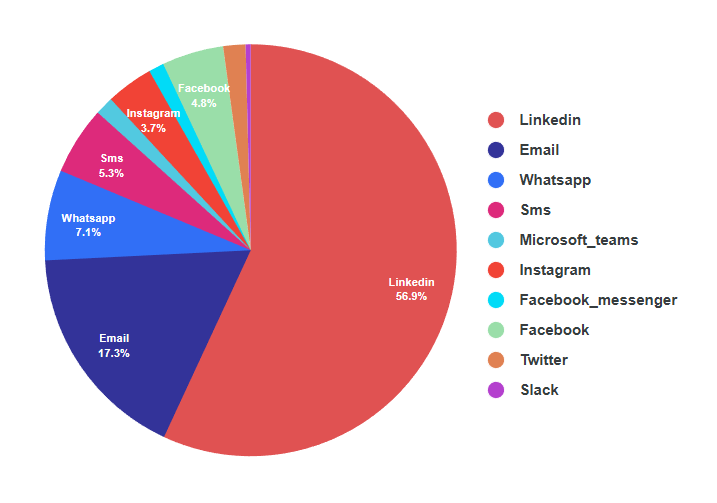
When you launch your Snöball campaign early, you gain real data on the social platforms and referral paths that convert. This lets you redirect paid ad budget toward the channels that actually work instead of guessing.
🎪 PHASE 4: ONSITE
10Lightweight AI Concierge Support
Tools: WhatsApp AI assistants, Grip AI Concierge
Workflow
Deploy an AI assistant that answers:
- “Where is this session?”
- “What sessions match my role?”
- “What exhibitors should I visit?”
- “Where can I find X?”
Feed it your agenda and FAQs for accuracy.
✅ Outcome
Less staff load. More attendee satisfaction.
More tools to explore
- Ada – No-code AI chatbot platform
- Intercom Fin – AI customer service agent
- Forethought – AI agent for support ticket deflection
- Yellow.ai – Enterprise conversational AI platform
11Real-Time Sentiment and Experience Monitoring
Tools: Sprout Social AI, Talkwalker AI, in-app chat analytics, ChatGPT
Workflow
Pull in:
- chat logs
- app reviews
- social mentions
- survey comments
Paste into AI:
“Summarize what attendees are enjoying, complaining about, confused by, and asking for. Rank issues by urgency and impact.”
✅ Outcome
You can fix problems in real time instead of waiting until next year.
More tools to explore
- Brandwatch – Real-time social listening with AI insights
- Meltwater AI – Media monitoring with sentiment analysis
- Hootsuite Insights – Social analytics
📊 PHASE 5: POST-EVENT
12Instant Post-Event Debrief Reports
Tools: ChatGPT, Notion AI, Descript, Otter AI
Workflow
Feed in survey results, session feedback, exhibitor comments, attendance data, and registration sources.
Prompt:
“Create a concise post-event report for leadership with highlights, challenges, recommended changes, and retention opportunities. Include a one-page executive summary.”
✅ Outcome
A polished report in minutes.
Chris mentioned using Supermetrics to automate the collection and compilation of post-event performance data from multiple platforms (registration systems, website analytics, social media, email campaigns, and more). Instead of manually pulling reports from 10 different dashboards and trying to synthesize insights, the AI compiles everything into unified reports.
This highlights trends, benchmarks against past events, and identifies areas for improvement, accelerating post-event evaluation and enabling truly data-driven planning for the next cycle.
More tools to explore
- Beautiful.ai – AI-powered presentation design
- Slidebean – Automatic slide design and formatting
- Plus AI – Creates presentations from prompts in Google Slides
13Retention Risk Forecasting
Tools: ChatGPT
Workflow
Provide engagement data, attendance patterns, and feedback.
Prompt:
“Cluster attendees by likelihood to return based on behavior, sentiment, and session choices. Recommend tailored year-round nurture paths for each cluster.”
This aligns with Freeman’s insight that memorable experiences drive retention.
✅ Outcome
A retention strategy grounded in real behavior patterns.
More tools to explore
- ChurnZero AI – Predicts retention risk and engagement decay patterns
- Custify AI – AI-powered customer health scoring adaptable for attendee retention logic
14AI-Powered Content Repurposing
Tools: Descript, ChatGPT, Canva AI, OpusClip
Workflow
Your sessions, panels, and interviews contain more value than you can ever fit into one campaign. AI makes it easy to repurpose this content for ongoing promotion and future events.
Step 1: Upload your session recordings
Use Descript or Castmagic to transcribe and organize the content.
Step 2: Generate multiple formats from a single recording
Paste transcript sections into ChatGPT and ask it to create:
- short blog summaries
- 10 social-friendly clips using OpusClip or Munch
- 5 quote graphics using Canva AI
- a whitepaper outline
- email or newsletter content
- key takeaways for next year’s messaging
This turns one session into a full content engine.
Step 3: Use recordings to help speakers promote your next event
AI tools can identify the strongest insights or moments from a speaker’s session.
Turn those into:
- short highlight clips
- pull quotes
- themed graphics
- a “best moments” montage
Use Snöball to assign each speaker a dedicated landing page for next year’s event. They can share these pages on social, giving them a professional way to promote their own thought leadership while helping you build early interest for your next event.
Step 4: Create gated or paywalled access if desired
Repurpose recordings into on-demand learning modules or a “premium insights” library.
Use AI to:
- write module descriptions
- generate lesson summaries
- pull out learning outcomes
- create teaser clips for social
This extends the life and value of your event content while generating potential revenue or lead capture.
✅ Outcome
You turn one event into months of personalized, high-performing content. Speakers get promotional assets they are excited to share. Your next event gets early visibility. Your audience gets ongoing value.
More tools to explore
- Castmagic – Turns recorded content into multiple formats
- Exemplary AI – Transcription and content generation
- Quso – Repurposes video for social
- Munch – Extracts the most engaging clips
- Repurpose.io – Automates distribution across platforms
🔄 PHASE 6: NEXT CYCLE
15Year-Over-Year Strategy Optimization
Tools: ChatGPT, your CRM
Workflow
Feed AI:
- channel performance
- conversion metrics
- persona data
- survey insights
- session attendance patterns
- top referral sources
Prompt:
“Analyze year-over-year performance and identify what should be repeated, eliminated, improved, or scaled. Recommend foundational strategies for next year’s campaign.”
✅ Outcome
A smarter strategy rooted in your own data.
More tools to explore
- Microsoft Copilot for Excel – Advanced data analysis in spreadsheets
- Julius AI – Data analysis assistant that works with your files
- Columns.ai – Collaborative data visualization with AI
- Polymer – Transforms spreadsheets into interactive dashboards
🎯 Key Takeaways
- AI saves time on repetitive tasks—not strategic thinking
- Start small with 2-3 use cases that solve your biggest pain points
- Use prompts as templates, then customize for your event
- Combine AI efficiency with human creativity for best results
Final takeaway
AI does not replace event marketing.
AI replaces the repetitive, manual parts of event marketing that drain your time and energy.
This guide gives you a practical workflow that saves hours, improves personalization, strengthens decisions, and opens up bandwidth for the work only humans can do:
Creating trust.
Designing experiences.
Activating community.
Driving growth.
And in 2026, the events that win won’t be the ones using the most AI.
They’ll be the ones using AI smartly to elevate what humans do best.